
Basics of How to Become a Successful Content Writer
From Keyword Research to Complete Draft: Know the Basics and See What’s In Store for You in My Training
After the influence of AI and the old writing styles, I think it is time to let you know what creative writing is all about, no matter if you are doing this in any niche.
Heading structure (H2, H3) can be different as per different client needs, but things like keyword research, creating auto SEO-optimized headings, paragraph writing rules, avoiding AI, capturing screenshots, fact-checking, and many other elements in this guide are for all niches. These guidelines are a pathway to becoming a better content writer for a successful career.
Part 1. Keyword Research
First things first, and that is the keyword research. The outdated technique is to use tools like Semrush or Ahrefs to hit specific keywords for topics that your competitors are ranking for, or use a keyword and come up with its different variations.
The problem here is that these tools show you those extra keywords that Google took into account by crawling them and making up its own syntaxes, which you think are secondary keywords. They are often full of grammatical mistakes. So, when you use these keywords in your main topic and stuff them in the article as well, you are asking for trouble.
Also, you might be taking a lot of secondary keywords into account with these tools as well, that may look the same and mean the same, and then you want the writer to forcefully stuff them into the article. This is what Google hates the most, as its last two updates are all about discouraging that behavior.
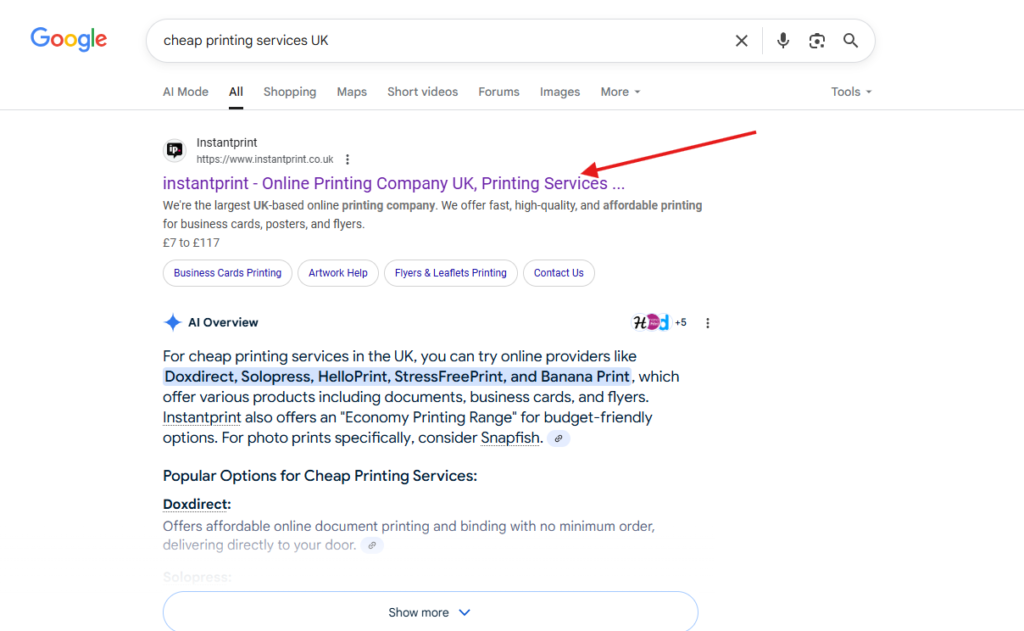
If you are targeting just one keyword and normally write about it, Google will automatically rank you for the secondary keywords even if you don’t use them at all. For example, if you search “Cheap printing services UK,” the following website pops up on top.
When you open the link, you’d be amazed that not a single time the keyword “cheap” was used in it.
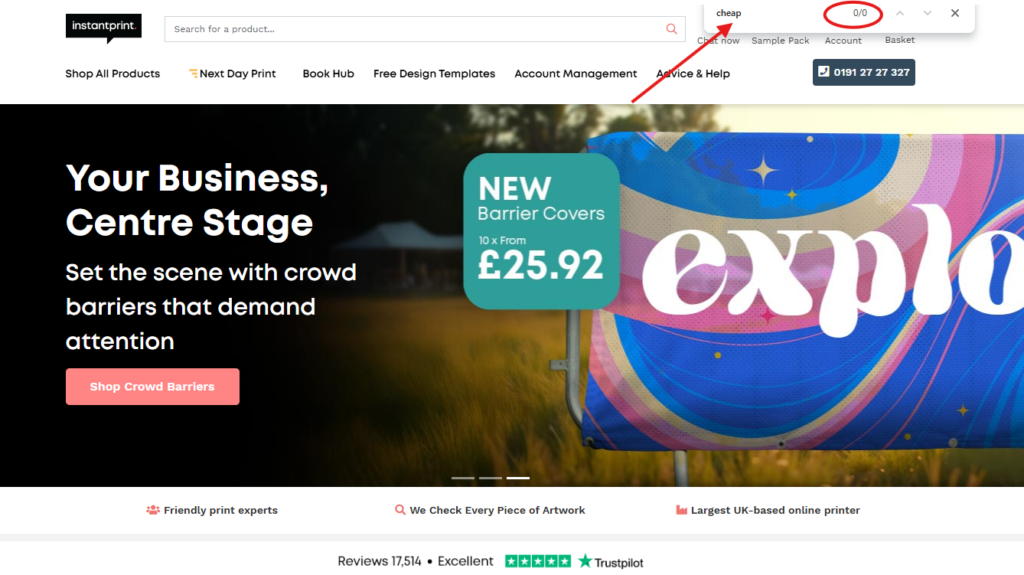
Strange, isn’t it? Well, no. Google may have crawled its pricing page earlier and established on its own that the service offers lower prices than others, so it can be that factor. Therefore, it is proof that if you cover ONE single topic as a whole, there is absolutely no need for secondary keywords or other lookalike primary keywords.
So what works now?
Well, you need to target one keyword only for one topic, and even if you don’t mention that exact keyword and write around it, you will still get better rankings than relying on the old approach.
You need to take the main keyword from whatever keyword research tool you are using and build a question out of it. But the catch is to target those keywords that others have written less about. For example, if you target “Best movies in 2026,” forget about the rankings because tons of your competitors have already written about it. However, if your domain authority is over 70, you can add fresh and better content to beat the outdated content your competitors have written. If your DR is low, you can go into the subniche and target “top horror movies to watch in 2026.”
In any case, your focus should be to target one keyword per topic. After you figure that out, it is time to write an auto SEO-optimized outline.
Part 2. Creating an SEO-Optmized Outline
Once you get the hang of that keyword research, it is time to create an automatically SEO-optimized outline. For this, you need to open a separate browser with a VPN installed and then choose the region that you want to target. Once that’s done, paste the whole keyword/topic in the Google search bar and hit Enter.
Make H2 headings
The next step is a bit technical. In the results, head straight to the “People Also Section” and create H2 headings from THE LATEST QUESTIONS in a flow. You can copy the exact questions as H2 headings because they are suggested by Google, which are meant to answer questions related to your keyword. Again, the flow is the key here. You can also add other H2 headings for better flow.
For example, if a topic is “Why is Labubu popular,” search it on Google, head to the PAA section, and create H2 headings like that:
- What Is Labubu? (Self-written to start the content better)
- Who made Labubu trendy? (Google PAA)
- How Did Labubu Get So Popular? (Google PAA)
- Why are Labubu So Expensive? (Google PAA)
- How Much does a Labubu Doll Cost? (Self-written for better flow between the previous H2 heading and this one)
- How to Buy an Authentic Labubu (Self-written to end the content on a better note that covers what is discussed above.
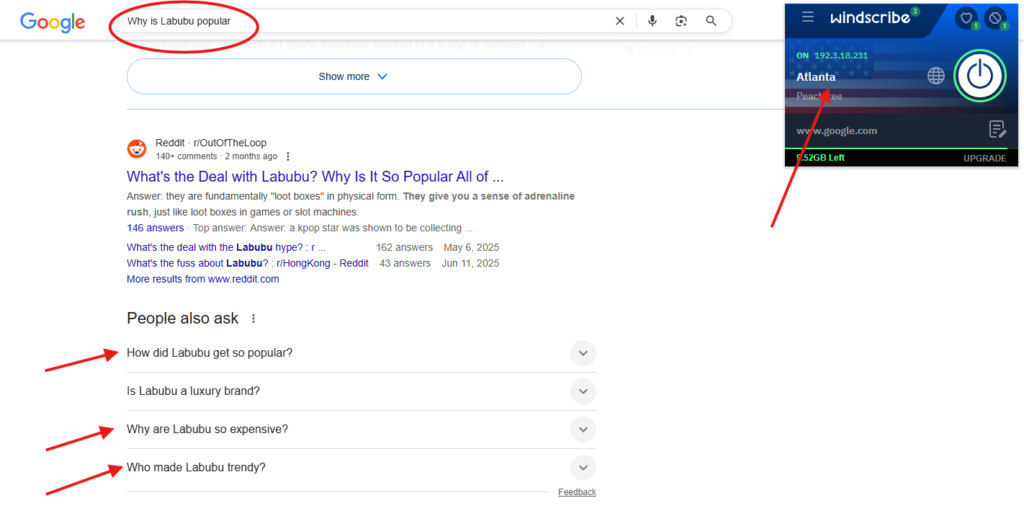
The thing to note here is that you have to come up with these self-written headings in complete question style, but still add Google PAA questions in them.
For example, if you just type “buy authentic labubu” on Google, you get the PAA question “How to buy an authentic labubu,” which you can use in the H2, and this takes care of the SEO element all by itself. If you just answer this question better without fluffing any other secondary keywords, your job is done. The same goes for every other H2 in the outline.
Creating SEO-Optimized FAQs
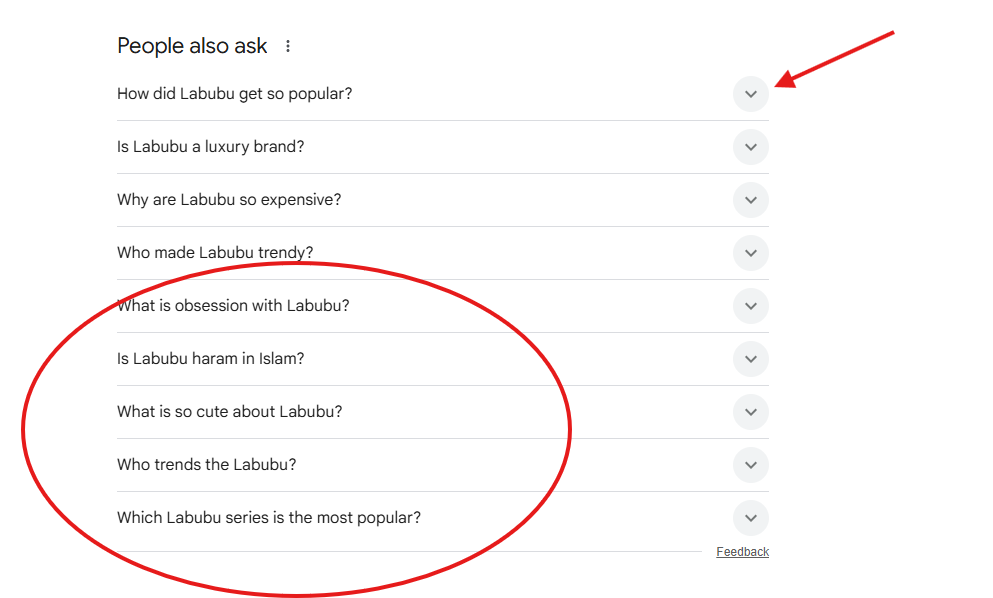
Then comes the FAQs part, and Google PAA is again your best bet here. When you search the main keyword and make H2 headings from Google PAA, there are still a lot of questions in this section, which you can use in the FAQ section to further SEO-optimize your content. Just click the down arrow keys next to different related queries, and you get other questions to answer in FAQs.
Part 3. Writing the Content
So now that you have a fully SEO-optimized outline, it is time to do the hard part, which is writing it. You need to understand that you have to talk to the reader like a friend trying to make something understandable to another friend. This means NOT using too much professional tone, which all seems very difficult and sometimes poetic to the reader. You are not here to impress others with your vocabulary; your job is to use as simple terms as possible.
Also, readers should feel that you are directly talking to them. Therefore, try to use “You” or “Your” quite often.
Then, there is AI. Whenever you ask ChatGPT or Claude to produce content, the facts will always be incorrect. For example, if you ask it for some HitPaw product steps, it will throw out and mix CapCut or other tools’ features in there as well, which may not even exist.
What happens then?
Your readers will read your article and think you are a joke. Not only that, they will never open any other article because they might have already made up their mind that all of the content is filled with false details like the one they just read.
Therefore, your research should be great, and I am going to guide you on how to do that from the first word:
The Introduction
The introduction part is super important because it creates the base of the article and attracts the reader to read further. When you use words like “In today’s digital age” or “In the digital world,” you are literally asking the reader to run away. Why? Everybody knows that this has been a digital age since the start of this decade, so why repeat it every time? No sense in this, so be unique every time according to the topic.
So, your introduction should be short, hit the pain point right from the start, without using question-like sentences, because this is an old way of writing.
Here is an example about the topic “Lego AI Video Generators.”
“There’s so much noise on social media about the Lego AI video generator, and something is really going on here. This whole thing popped up as creators now use Lego characters in action-packed clips with AI tools. That’s right, no stop-motion or physical bricks, just pure digital chaos, and it caught on fast, especially with how amazing and realistic the output is.
Below, you’ll find out about some of the best tools to generate a LEGO character of your choice with text prompts, images, filters, and AI effects.”
Do you see any question-like sentences here, any kind of difficult words like “grab attention” or the use of AI tone, or difficult words? This is how people talk, and this should be your approach in every paragraph of your article. Be human, be natural.
The introduction above just addresses the pain point by coming up with a question in the first paragraph and answering it in the second, without even revealing anything.
Writing Content Under H2 Headings and Making H3 Headings
Whenever you start an H2 heading, always write a brief introduction related to this specific heading. You can also insert the main topic name naturally here.
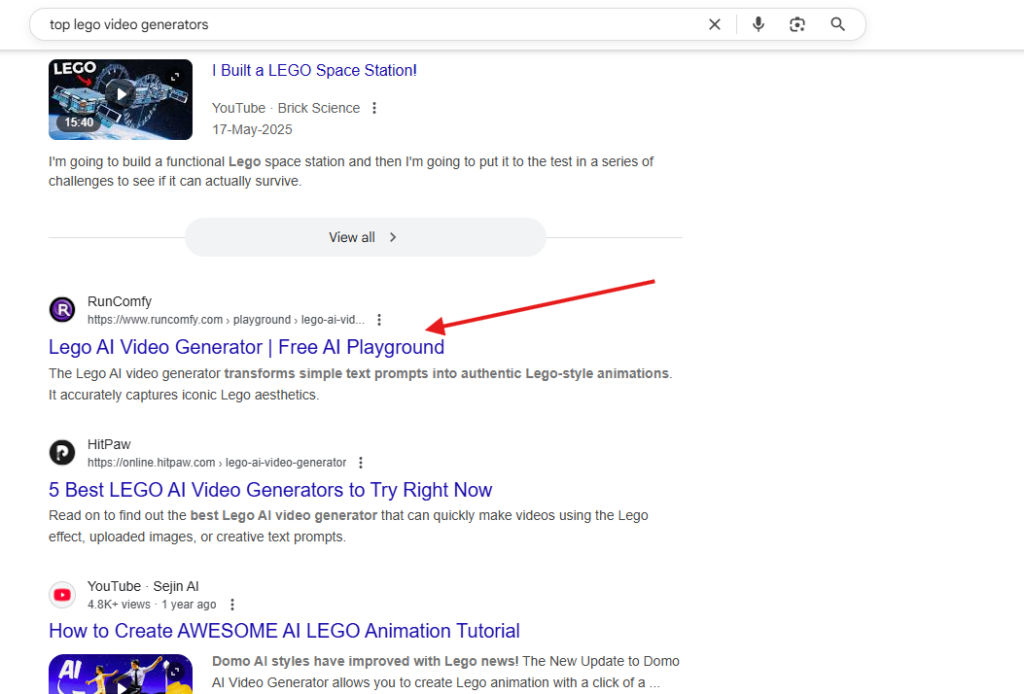
If you are writing a top list article like the top Lego AI Video Generators, create an H2 (like 5 Top Lego AI Video Generators), and then you need to do separate research here. The shortcut here is to just research this H2 heading separately on Google (US VPN on another browser) and pick the top tools yourself instead of relying on older blog posts that may have outdated information with incorrect features. Here is the one that is picked up by searching the H2 on Google, without referring to any other article.
To write the content for any tool, open its website and explore the tool’s homepage, the dashboard, and the pricing page. This way, you get all the facts you need about the features. Here are a couple of pictures for a tool that you searched for in the previous step to identify the features.
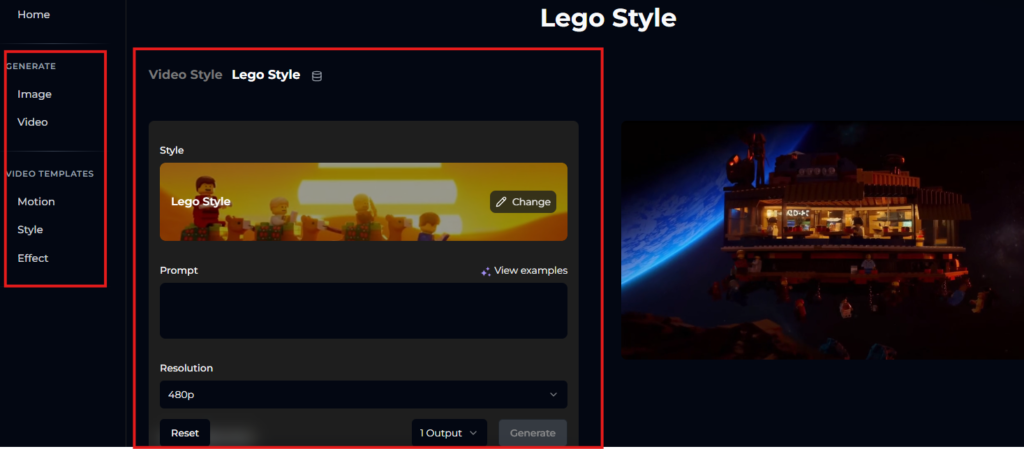
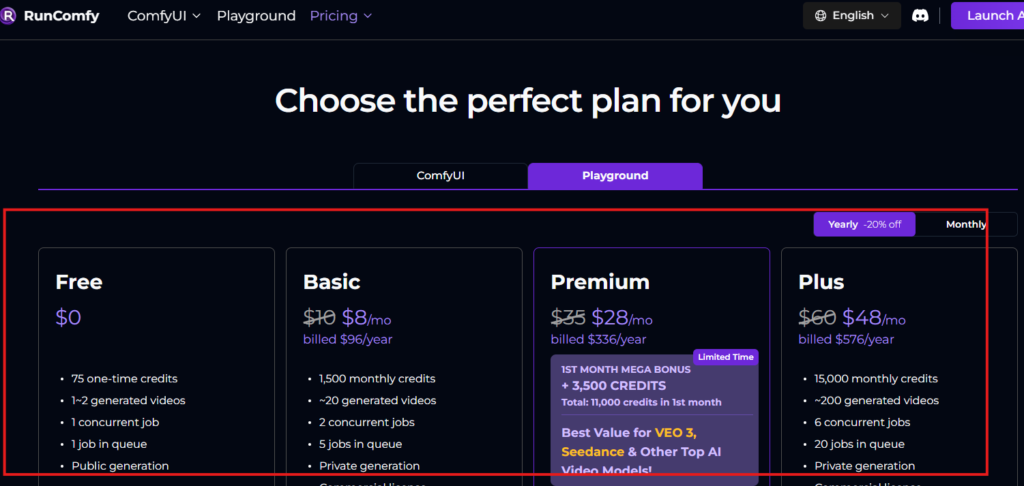
Now, you have a ton of information to write for a tool according to the word count you set for each H3 (tool name) under the main H2. The facts would be correct, and all of it will be knowledgeable enough for the reader. Remember, your every sentence should add unique value instead of repeating the sme thing using other words over and over again. This is totally unacceptable.
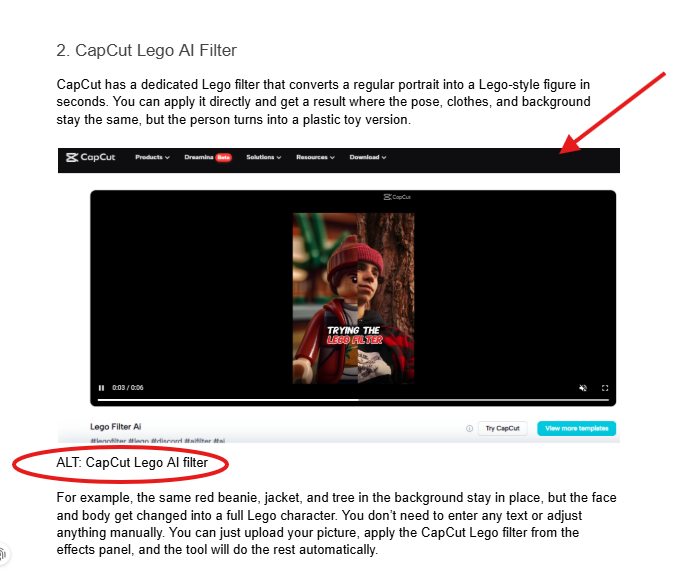
In the top-lost article, one screenshot of the tool’s homepage or the dashboard is enough with the accurate ALT text, like this:
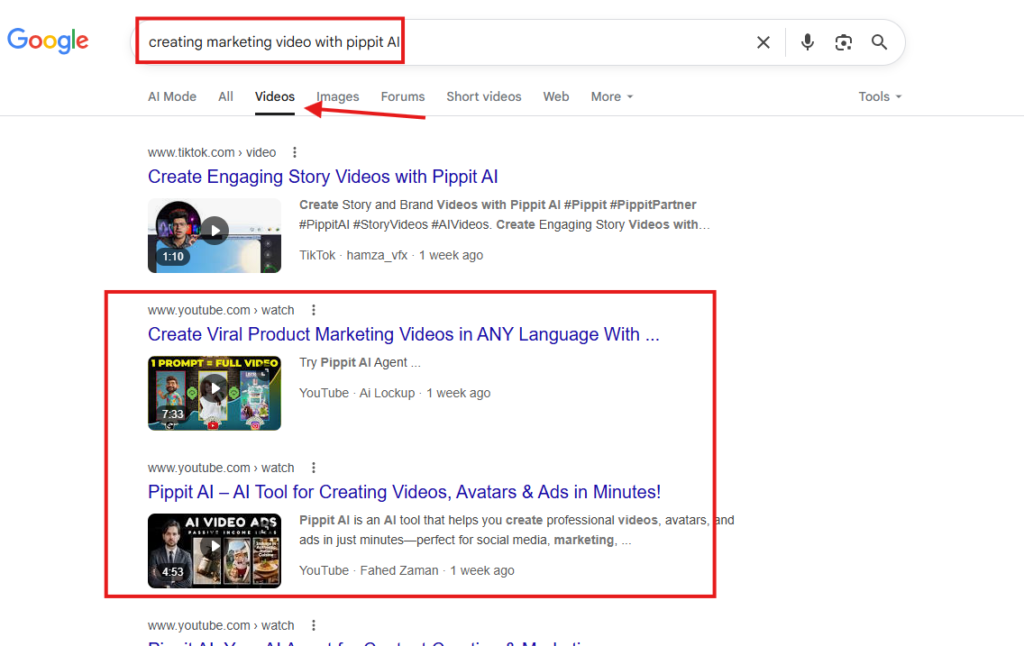
If you are writing a how-to guide under an H2, you can use two approaches here. The first one is to visit the tool, do it manually by yourself, and write every step along the way. The other is to see the new and complete YouTube video about it to write. But make sure to watch only those videos of the tool that are related to the topic. For example, if the topic is about creating marketing videos using Pippit AI, search for this keyword on Google, go to the video section, and choose the latest and most relevant one, as shown in the picture below:
Next, create H3 headings in this H2 to discuss the step-by-step guide in detail, with screenshots.
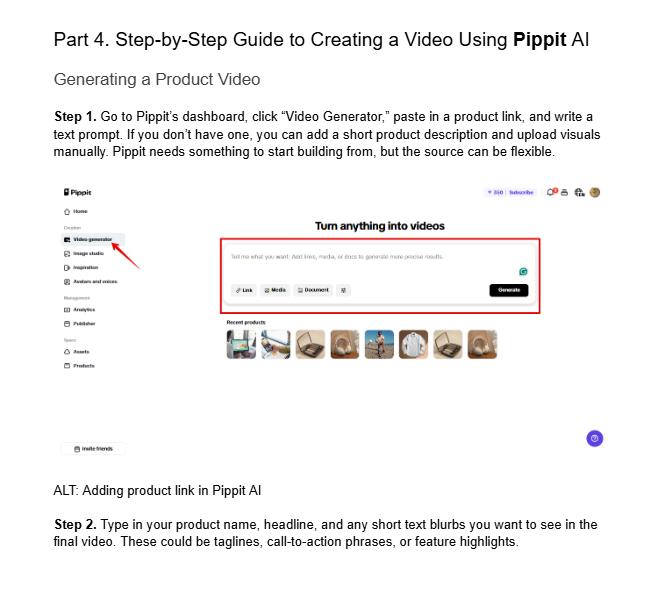
As for the screenshots for each step, you can either capture edited YouTube clips. To do this, pause in the middle of the step, take a screenshot using the Snipping tool, and add arrows, boxes, or circles to explain the step to the reader. Make sure that the channel name or anything else is not revealed to disclose that you captured the screenshot that way. This helps avoid any copyright laws.
IMPORTANT: Whenever you write about any digital products, no matter if it is a top-list, how-to, or a general informational blog, always use it yourself based on the demand of the topic instead of relying on blogs or videos, as these tools are updated frequently, and the content you find on other resources is most likely outdated.
The FAQ Section
As you’ve already selected the additional questions related to the topic using Google PAA help, try to answer them within 50 words. Whenever you answer one, do not start without taking the question into account. For example, if the question is “what is the best AI video enhancer,” do not answer like HitPaw AI Video Enhancer does this or does that. Instead, write “HitPaw AI Video Enhancer is probably one of the best tools out there…..
The Conclusion Part
In this section, you should summarize each H2 heading and add a CTA for the product in the end if it is discussed in the article. Use the main keyword one time here.
Part 4. Common Writing Mistakes that Writers Make While Writing Content
Use of AI to Produce and Write Content
Most of the writers just use ChatGPT to write the content. For example, ChatGPT was asked to write the introduction of the same Lego AI Video Generator, and it created the following:
“Lego AI video generators combine creativity with technology, letting you turn your Lego builds or ideas into lively animated clips. These tools use AI models to transform photos, designs, or prompts into engaging videos that highlight characters, sets, and scenes. Whether you’re showcasing custom builds, storytelling with Lego figures, or experimenting with fun edits, Lego AI video generators provide a simple way to create eye-catching content that feels playful and imaginative in just a few steps.“
You might be impressed with the professional tone, but if you take a closer look, it is all poetry; the words are too difficult, and even the connectivity words like “Lego builds,” “feel playful,” “custom builds,” and so many other words don’t mean anything at all and do not work for a native English reader.
If you compare this ChatGPT garbage with our humaized introduction that I’ve written, you’ll notice a huge difference between AI and human content. Here it is again.
“There’s so much noise on social media about the Lego AI video generator, and something is really going on here. This whole thing popped up as creators now use Lego characters in action-packed clips with AI tools. That’s right, no stop-motion or physical bricks, just pure digital chaos, and it caught on fast, especially with how amazing and realistic the output is.
Below, you’ll find out about some of the best tools to generate a LEGO character of your choice with text prompts, images, filters, and AI effects.”
There is another mistake writers make here to trick their clients. They generate the content through AI and then try a humaizer tool, which not only messes up the content further, but also leaves traces for a trained professional like us to judge that it is actually AI content, and I can do so without even using AI checker tools.
Here is what AI does, and even if you don’t use it, avoid these mistakes in your natural style of writing:
- AI never throws out fact-based information. The facts are wrong most of the time.
- AI starts sentences with words like “From” and “Whether.”
- AI also starts with a word in continuous tense after placing a comma in a sentence.
- AI uses words like these: Specific, distinct, seamlessly, mix, mix of, offer, indicates, involves, involve, make, proper, excessive, elevate, cater, think of, epic, specializes, straightforward, gems, treasure trove, vast, focus, goldmine, comprehensive, say goodbye, featuring, dreamed, unique, stands out, swiss army knife, extensive, database, solid, complex, understand, diverse, sophisticated, navigate, perfect, dive, shine, showcase, magical, plus, flexibility, like, like having, whether, identify, ideal, crucial, vibrant, equipped, harness, transform, immerses, gold mines, enable, arsenal, robust, polished, phenomenon, delivers, clean, demonstrate, across, specialized, special treatment, spans, enhance, strong, excels, significantly, maintain, making, while, organized, eye-catching, impact, empower, personalized, etc.
- These are just examples, and I know more than 300 AI words that the writer can never come up with on their own, naturally.
- AI uses dashes in the middle of sentences.
- AI uses question-type sentences a lot.
- AI tries to use vague filler words at the end of the sentences, like “without any setup,” without further complications,” etc.
- AI uses feels, makes, stays, builds, feels smooth, types of words more than 30-40 times in the content to humanize content, which results in extreme fluffing of that same word.
Not Following Paragraph Writing Rules
You need to remember that you are not writing essays, so write in short paragraphs if paragraph writing is involved in a section. Ideally, 3-5 lines are enough.
Also, you might be doing what AI does, and that is not connecting the sentences in each paragraph. You have to write like you are talking to a friend instead of ordering them to do so. Here is an example:
“Charli D’Amelio blew up on TikTok back in 2019 when she was just posting dance videos, everyday photos, and just normal bits from her life. She’s now brought that fame to Instagram and has literally become the most-followed teenager today. The reason why she’s so popular is that she seems like a regular kid who just happens to dance really well. That’s why big companies like Dunkin’ Donuts and Hollister wanted to work with her.
Do you see what I’ve done here? There are no difficult and AI words in them. I also connected the sentences in a way that they all relate to each other with the use of words like “now,” “the reason why,” and “that’s why.” You need to do this naturally in each paragraph and be unique every time with the choice of these transitioning words. Also, every sentence is in order and in flow because I have not placed a misfit sentence that doesn’t connect to the previous and next sentence. Do the same thing to connect paragraphs with each other in a section for a better flow.
Another thing is to never fluff the same word in one or consecutive sentences because natives don’t speak or write it like that.
Capturing Images Incorrectly
You may think you have captured a great screenshot, but if it shows black corners like the right or left ends of the device’s screen, or the Google search bar at the top, they are useless. Only capture what is needed there, and avoid over-capturing.
For general use, use royalty-free ones like those on the Pexels site. If you are writing for a client’s product, use it, and take the screenshots directly from the dashboard.
Failing to Do the Fact Check
A quick glance at what you’ve written is of utmost importance. For instance, you may have talked about a tool that has AI effects, and you wrote them as templates. Also, you may have messed with the brand names. For example, it is YouTube, not youtube. So, always pay attention to these facts, especially in the top-list articles and how-to guides.
Breaking the Structure
What distinguishes one website from another? It is the structure (Intro length, H2 and H3 headings, FAQs, Conclusion), and I follow a strict one for every client.
So, when you complete the article, do a quick check, identify the mistakes, and fix them.
Not Checking the Grammar
Grammarly is a great tool to check grammar. It shows red lines for spelling mistakes and punctuation mistakes. It also shows green and blue lines under the words or sentences as suggestions. If you follow them, your content again becomes AI, as these are all AI-based suggestions.
Therefore, always correct the mistakes that show up with the red lines and avoid all the other suggestions.
Part 5. Conclusion: The Rankings
I know the website authority matters when it comes to rankings. However, the writing part facilitates that authority, along with targeting the single keyword. When you write in a human way and state the correct facts, you increase the authority with creativity.
The combos of these three are what make the difference. So, these are just the basics. If you want to be an expert, get on board for a 2-month training course that will cover everything in great detail, as this short guide is just a hint. Yeah, it takes that much effort to write a single piece, but if these things are on your fingertips, this will be like driving a car without knowing it. Good Luck!